Case study · Project
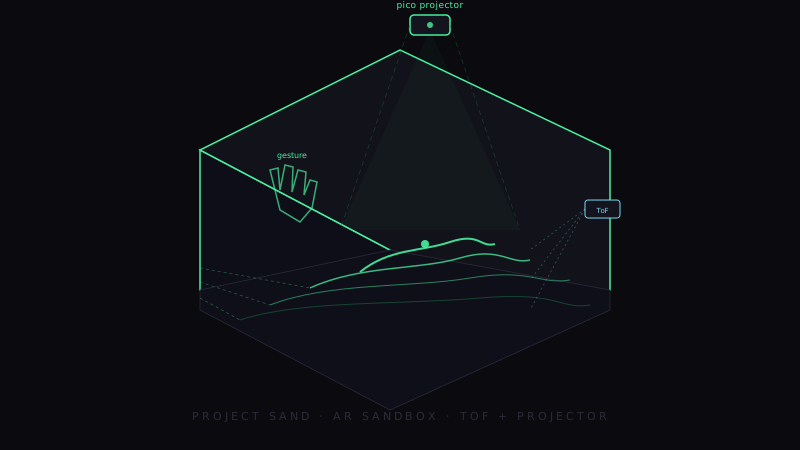
Project Sand
An AR sandbox with real-time gesture control. Depth in. Topography out. Hands move terrain.
Why this matters
Physical terrain that talks back.
I'm Norville, and I built the box this thing lives in — but Project Sand isn't really a box. It's a closed loop. A camera sees the sand. A Jetson decides what the sand means. A projector paints the meaning back onto the sand. You move the sand with your hand and the meaning moves with it. No mouse. No app. No screen between you and the work.
That loop, sub-second, in an enclosure the size of a shoebox, is the demonstration. Depth-sensing input, real-time inference on the edge, projection-mapped output, and gesture-driven UX — every layer of an AR system, integrated, deployed, and reproducible on commodity hardware. It's our reference build for AR / spatial computing engagements, and it runs in the lab right now.
Built on prior art
Credit where credit is due.
Project Sand inherits its core interaction model from the Augmented Reality Sandbox — UC Davis KeckCAVES, Oliver Kreylos, 2012 — the original open-source project that pioneered hand-shaped-terrain plus projection mapping on Linux with depth-camera input. Sculpt the sand, see contour lines and elevation colormaps painted back on the surface in real time. That model is theirs. Kreylos's research notes and the SARndbox software live at web.cs.ucdavis.edu/~okreylos/ResDev/SARndbox.
Project Sand's contribution is the rebuild on top:
- Edge compute on Jetson AGX Orin. No host PC — the whole pipeline runs on a single embedded board.
- ToF + EO sensor fusion. The reference design used a Kinect. We use a current-generation MIPI-CSI ToF plus a calibrated RGB camera, fused on the Jetson.
- In-house 3D-printed chassis. Frame, sensor cage, projector mount, calibration jig — all printed on AK-mee's shop printer (see below).
- AK-mee gesture-classification stack. 25 gestures, dual-mode surface/air arbitration, demo-mode and safe-mode runtimes on top of the core terrain loop.
Open-source core, modern edge hardware, a chassis we can build on demand.
The build
Five subsystems, one loop.
1. Compute — NVIDIA Jetson AGX Orin
The whole pipeline runs on a single Jetson. CPU handles the sensor I/O and the web stream; CUDA handles the heavy lifts — colormap rendering, contour extraction, hillshade lighting, and the optional water simulation. The runtime is containerized so deployment is one image, one systemctl restart, and we're back. No bench-only dependencies. Boot to running in under thirty seconds from a cold start.
2. Sensor stack — ToF + EO, with a CSI experiment that didn't ship
The sandbox sees in two production modalities, fused on the Jetson, plus a third we explored and parked.
- Time-of-Flight (ToF) depth sensor. Primary terrain height-map. Arducam ToF over MIPI CSI-2, ~5–30 Hz depending on integration time, sub-cm depth precision at the working volume. We capture a flat-field reference during calibration so per-pixel bias and dead pixels get corrected before they reach the rendering stage. This is the truth source for elevation.
- Electro-Optical (EO) RGB camera. Color overlay context, calibrated against the ToF for fused depth + color. The same homography that aligns the projector also lifts the EO frame into the ToF's coordinate system, so a colored object on the sand can be tagged at the right elevation rather than registered as two unrelated observations.
- CSI auto-focus camera (Jetson MIPI-CSI port). Explored as a higher-resolution EO backup. Honestly: never shipped — auto-focus hunting under the projector's IR component pushed the feed out of focus during interactive use, and locking focus killed the resolution advantage we were chasing. Parked under a feature flag so the code path doesn't bit-rot, but the production build runs ToF + USB EO only.
3. Projection — pico projector + homography
A pico projector, mounted above the sandbox, paints the topographic visualization directly onto the sand. The wrinkle: the projector and the depth camera don't share an optical axis. We solve that with a four-corner homography wizard — drag four corners of a calibration pattern to align the projection to the real ROI, save it, forget it. The projector now paints exactly where the sensor is looking.
4. Gesture detection — dual-mode, 25 gestures
Surface gestures (a hand reaching into the box) come from the same ToF stream: pixels that suddenly read closer than the calibrated baseline are segmented as a hand, and convexity-defect analysis on the silhouette counts extended fingers. Air gestures (poses outside the box) come from the EO RGB camera running MediaPipe or a TensorRT-accelerated pose model. The two streams merge through a priority arbiter: surface controls terrain, air controls the UI, override gestures always win. Twenty-five gestures total — static poses, dynamic motion, and compound gestures like grab-and-drop.
5. Enclosure — printed, not bought
This is the part I own end-to-end. The enclosure is parametric OpenSCAD: frame, sensor cage, projector cradle, vents, lid, and the calibration jig. We print on AK-mee's Creality Ender — PETG for the structural frame (heat tolerance near the projector beam, decent stiffness), PLA for the calibration jig (geometry-critical, not load-bearing). Every revision goes through a draft fit-check first (0.3 mm layers, 10% infill) before the production print (0.2 mm, 25% infill). All dimensions live in design_assumptions.md so the next revision starts from verified numbers, not memory. Detailed chassis breakdown in the next section.
In-house chassis
3D-printed end-to-end. Norville-led.
The Augmented Reality Sandbox reference design assumes a custom-fabricated wooden frame with the projector hung overhead on a wooden arm. Beautiful, but it requires a workshop, hand tools, and lumber-grade tolerances. We don't run a woodshop — we run a print farm. So Project Sand replaces the wooden frame with a fully 3D-printed modular chassis.
Four printed assemblies make up the build:
- Sandbox frame. Structural shell, sand-pan support, projector-arm anchor. PETG for stiffness and modest heat tolerance. Modular — panels bolt together on heat-set inserts so each fits a single Ender build plate.
- ToF / EO sensor cage. Mounts both sensors rigidly on the same baseline so calibrated extrinsics survive power cycles. Cable channels keep the MIPI ribbon and USB cable out of the projector beam.
- Projector mount. Cradles the pico at the offset and tilt the homography expects. Friction-locked so a bumped projector can't silently desync calibration.
- Calibration jig. Printed plate with known checkerboard and 3D fiducials driving the seven-step calibration wizard. PLA — geometry-critical, not load-bearing.
Designed in OpenSCAD, sliced in Creality Slicer, printed on AK-mee's Creality Ender. Total print time across all parts on a fresh build is ~28 hours; filament cost is ~$45 in PETG and PLA spool fractions. STLs live in the repo for anyone who wants to bench-build without rebuilding the OpenSCAD model. The chassis is parametric — a 1.5× sand-volume variant is a parameter change and a longer print, not a redesign.
System diagram
Project Sand — sensor + compute + projection loop.
Depth in. Color in. Inference. Projection out. Gestures and terrain close the loop on the same sensors.
Lessons learned
Five things the sandbox taught us.
1. ToF is enough — most of the time.
We started assuming we'd need a high-resolution RGB camera for gesture work. We didn't. Surface gestures fall out of the depth stream we already have, free, with no extra optics and no extra latency. The EO RGB camera stayed in the design for color overlay and out-of-box air gestures, but the sandbox's primary interaction never leaves the ToF pipeline. One depth stream, two interaction modes.
2. Calibration is a product, not a step.
The first version asked the user to eyeball alignment. The current version has a seven-step calibration wizard — flat-field, dead-pixel detection, dead-pixel interpolation, amplitude tuning, ROI, depth range, projector homography — and saves the result. Boot, run, done. Treating calibration as a first-class user-facing flow turned a thirty-minute setup into a thirty-second one and made the system portable between rooms.
3. Demo mode pays for itself.
The pipeline runs end-to-end with no hardware attached: python3 sand.py --demo generates synthetic terrain and synthetic gestures. That decision means we can develop on a laptop on a plane, run the test suite in CI without a Jetson in the loop, and demo the software at a conference table when the sandbox is back at the lab. One hundred and fifty-three unit tests, all hardware-free.
4. Print drafts before you print parts.
Every chassis revision gets a fast draft print first — 0.3 mm layers, two walls, ten percent infill — before the long production print. The draft catches the 90% of errors that matter (clearance, cable paths, mounting hole alignment) at roughly half the print time. Half the wait, almost all the validation. We codified it as a rule: no production print on a new revision until a draft passes a fit check.
5. Safe-mode beats perfect-mode.
For a demo system, the worst failure mode isn't a wrong frame — it's a black screen. The runtime ships with --safe-mode: every stage of the loop is wrapped in error recovery, the last good frame is reused on a fault, and the camera reconnects automatically when the cable gets bumped. The sandbox never freezes during a demo, and that's the only metric that matters when there's an audience watching.
What's next
Where this build can go.
The Project Sand reference design is small, self-contained, and reproducible. Once the loop closes — depth in, inference, projection out, gesture-driven UX — the substrate stops being a sandbox and starts being a platform. A short list of directions we're exploring:
- Education. Earth-science, geology, and watershed-modeling curricula benefit from a tactile topography surface. The water simulation plus erosion already runs; pairing it with a structured lesson plan is the next step.
- Training & rehearsal. Search-and-rescue, wildland-fire, and military terrain rehearsal traditionally use static sand tables. A live, gesture-controlled, projection-mapped table layers contour, slope, and line-of-sight overlays on top — same form factor, decision-grade visualization.
- Museum & trade-show installations. The system was designed for the worst-case demo environment: bad Wi-Fi, bright lights, live audiences. With a robust enclosure and safe-mode runtime it slots into a public-installation context with minimal support overhead.
- Demo platform for engagements. When a customer engagement calls for AR, depth-sensing, or gesture control, Project Sand is the working reference we point at. Stack swap-out (different sensor, different projector, different inference workload) is a parametric exercise — not a rebuild.
The sandbox is internal AK-mee™ intellectual property. If you have an AR, spatial-computing, or interactive-installation problem and you'd like to start from a working reference instead of a slide deck, the principal would like to hear about it.
3D models
Viewers, behind your access portal.
Interactive 3D models for this build — enclosure, chassis, sensor mounts — live behind authenticated access. Named project team can rotate, inspect, and download models from the AK-mee Access portal.
Norville · Mechanical Engineering & Manufacturing · AK-mee™ · Updated 2026-05-03
Original case study by Norville · Mechanical Engineering · 3D Print & Manufacturing Lead.